Power and CAN
Charge one battery first
Use one MK ES17-12 battery, its am-4483 battery lead, the terminal hardware supplied with the battery, and the AndyMark am-4968_1 single-bank SB50 charger. The separate am-3062h hardware kit is an alternative, not an additional requirement. One battery powers the base; the second is a spare, not a series or parallel addition.
The battery lead must be correctly fitted and insulated before charging. Cover the exposed terminal/lug hardware with the BOM-listed Super 33+ electrical tape, without placing tape between electrical contact surfaces. If the cable is not attached yet, complete that attachment before connecting the charger; do not improvise a connection. Keep the battery disconnected from the robot. Battery terminal insulation reference .
Charging steps
For the NOCO GEN5X1 with AndyMark’s SB50 connector, once the battery lead is correctly installed:
- Disconnect the battery from the robot. Put the cool, undamaged battery upright on a stable surface in a dry, ventilated area away from flames and sparks. Leave the charger uncovered.
- With the charger unplugged from the wall, mate its SB50 connector with the battery cable’s matching SB50 connector. Do not force a mismatched connector.
- Plug the charger’s AC cord into a suitable wall outlet.
- Press MODE until 12 V AGM is selected. Do not select lithium, repair or force mode for this normal charge.
- Wait for the 100% indicator to become solid green; the lower charge indicators turn off. A pulsing green indicator can still mean charging/optimization. Charging time depends on the starting charge, so use the indicator rather than a timer.
- Unplug the charger from the wall first, then disconnect the SB50 plugs by their housings, not their wires.
- Repeat for the second battery. This single-bank charger charges one battery at a time; do not join the batteries together.
If an error indicator appears, or the battery becomes unusually hot, swollen or leaks, stop charging and disconnect AC power if safe. Do not use force mode to bypass an unexplained fault. A different charger model needs its own instructions.
Sources: NOCO GEN manual, connection and charge indicators · AndyMark charger and SB50 configuration · ES17-12 battery type .
Connect the PDP input cables
Keep the battery unplugged. This step attaches two cables to the PDP only; leave their other ends disconnected. Do not connect motors yet.
Parts and tool
- CTRE PDP 2.0, its two supplied M6 × 10 mm screws, two split washers and two input covers.
- Robot-side SB50 harness from am-4481_B18R07: the cable assembly with the shorter red lead and longer black lead.
- One received BatteryCablesUSA red 6 AWG, 12-inch M6/M8 lead for EV200-to-PDP. Use the smaller 1/4-inch/M6 ring at the PDP; reserve the larger 5/16-inch/M8 ring for the contactor. The second matching lead is breaker-to-EV200. The am-4480 direct jumper is spare in this layout.
- 5 mm hex driver from the BOM-listed Bondhus metric set. Use a fully seated straight end, not an imperial substitute.
Attach the two lugs
- Place the PDP on a stable, nonconductive surface. Find the large inputs marked NEGATIVE and POSITIVE, not the small numbered output terminals.
- Place the robot harness’s black cable lug flat against the NEGATIVE input. Put a supplied split washer on a supplied M6 screw, pass the screw through the lug and start it by hand.
- Attach the smaller 1/4-inch/M6 ring of one BatteryCablesUSA lead to the POSITIVE input with the second supplied screw and split washer. Leave its larger M8 ring disconnected for the EV200 connection. Route both cables without pulling on the lugs.
- Tighten both screws by hand to snug, as CTRE permits. If using a suitable torque driver and correct bit, the specification is 2.5 Nm (22.1 in-lb); do not exceed it. Neither lug should rotate. Fit the supplied input covers.
Stack from the screw head down: screw head → split washer → cable lug → PDP metal terminal. Nothing goes between the lug and terminal.
The harness’s short red lead remains disconnected for the main breaker; the new red lead’s M8 end remains disconnected for the EV200. Leave the battery disconnected. The intended positive path is SB50 → main breaker → first BatteryCablesUSA lead → EV200 → second BatteryCablesUSA lead → PDP. The am-4480 jumper does not bypass the contactor.
References: CTRE PDP 2.0 manual, page 7 · BatteryCablesUSA precrimped lead family .
Drive check materials
This is a gathering checklist for the four-module base, using existing BOM parts—not a new order or permission to energize the assembled parts. Wire lengths and connector consumption depend on the actual routing. Keep the battery disconnected during preparation.
Battery and power distribution
| Part | Quantity for the base |
|---|---|
| Charged MK ES17-12 battery, am-4483 lead and battery-supplied terminal hardware (am-3062h is an alternative) | 1 set |
| AndyMark am-4481_B18R07 robot power cable kit, including 120 A main breaker | 1 kit |
| CTRE PDP 2.0, supplied input hardware and terminal covers | 1 |
| 40 A AT2 breakers, am-4947 | 8: one per motor; reserve the ninth for the lift |
| 5 A breaker | 1: shared CANcoder supply |
| Supplied Kraken power leads | 8 motor sets: four X60 and four X44 |
| BNTECHGO 10 AWG red/black wire and WAGO 221-612 connectors | Existing stock, for motor extensions where needed |
| BNTECHGO 18 AWG red/black wire and WAGO 221-415 connectors | Existing wire; 2 five-way connectors for the four CANcoders |
Stop circuit
| Part | Quantity |
|---|---|
| GCX1131 emergency-stop operator with N.C. contact block; ECX1651 legend | 1 each |
| TE Kilovac EV200AAANA contactor | 1 |
| BatteryCablesUSA S6 precrimped 6 AWG cables, M6/M8 ends | 2 |
| Littelfuse FHAC0001ZXJ fuse holder and 0287003.H 3 A fuse | 1 each |
These are the purchased stop-circuit components; the BOM still records the EV200 as ordered, not received. The proposed breaker/contactor mounts are retired; the user will handle internal mounting. The added supports and strap models have been removed from both active Onshape assemblies. Physical fit and the stop/reset wiring remain unverified; this list is not a circuit diagram. The separate YAM power supplies are not disconnected by the base contactor. Do not substitute the small E-stop contact block for the high-current contactor.
CAN, computer and cable management
| Part | Quantity / allocation |
|---|---|
| CTRE CANivore and included USB-A-to-C data cable | 1 each |
| Phoenix Pro CANivore bus license | Existing license; verify activation during setup |
| Four CANcoders and the eight motors’ supplied CAN leads | Already part of the modules |
| CTRE CAN bus/power cable kit and yellow/green twisted CAN cable | Existing stock |
| CTRE 120 Ω termination resistors | Have the pack available; final count depends on the bus endpoints and built-in termination |
| WAGO 221-2401 inline connectors | Existing stock for appropriate small-wire joins |
| CanaKit Raspberry Pi 5 kit with its included case and power supply | 1; stationary setup initially |
| 8-inch zip ties, VELCRO ONE-WRAP ties and Super 33+ tape | Existing stock for cable management and insulation, not an assumed battery restraint |
Tools
- WCP 0.9 Nm torque driver with T10 bit for motor power terminals.
- WCP 0.6 Nm torque driver with T8 bit for motor CAN terminals.
- PDP WAGO tool, Klein 11053 stripper for the heavy motor wire, and the BOM-listed Irwin stripper for supported smaller wire sizes.
- Existing Bondhus keys, appropriate hand drivers and Wheeler torque driver where their size and torque range match the specific fastener. Do not use the motor-terminal settings on battery or PDP hardware.
Still needed before motion
The BOM does not establish a complete test fixture: stable wheels-clear support, secure battery/electronics restraints and a verified mobile power arrangement for the Pi still need resolving. Electrical polarity/short checks, current limits, encoder calibration, stop/reset behavior and control software that disables motion on connection loss must also be verified before a floor test. A multimeter is not listed in the BOM; it remains a missing verification tool, not an assumed owned item. Upper-frame, arm and lift assembly are outside this initial check.
Tools
| Tool | Notes |
|---|---|
| Multimeter | Check polarity and connections with power disconnected. |
| Wire stripper and appropriate hand/torque drivers | Reuse existing tools. |
Manufacturer diagrams
| Task | Illustrated reference |
|---|---|
| Attach the X60 and X44 leads | Motor terminal diagrams |
| Mount and connect the PDP | CTRE PDP 2.0 manual, pages 6 and 9 |
| Connect CANivore and terminate CAN | CTRE CANivore setup |
| Assemble the E-stop operator | AutomationDirect GCX mounting diagrams |
Connection notes
| Connection | Check |
|---|---|
| PDP input | Battery disconnected. Lug flat against terminal; supplied split washer under supplied M6 × 1 × 10 mm screw. 2.5 Nm maximum. Fit covers. |
| PDP outputs | 10–22 AWG; strip 3/8 inch. Open with the lever tool, insert fully, release and check retention. No loose strands. |
| Motor branches | Separate positive/negative output pair and breaker for each motor. Follow printed polarity. |
| PDP mounting | Four corner holes take #10-32 screws, separate from the M6 electrical terminals. The proposed printed feet are retired; the user will choose the mounting method. Support cables separately. |
| CANivore mounting | User-selected mounting. Keep USB, CAN and indicators accessible. |
The CANivore route was checked with 3.6 × 1 mm ties through 4.978 mm rail holes. Confirm the actual ties fit. Physical retention still needs checking.
Full base allocation
| Load | Branches | Protection |
|---|---|---|
| Four X60 drive motors | 4 | 40 A per motor |
| Four X44 steering motors | 4 | 40 A per motor |
| Four CANcoders | 1 | 5 A |
The ninth purchased 40 A breaker is reserved for the lift. The encoder branch uses an 18 AWG trunk and two separate five-way WAGO connectors, one for each polarity. Each connector joins one trunk wire to four sensor leads. CANivore uses USB power in the current arrangement.
Physical PDP terminal assignments and cable lengths are still to be set on the assembled frame. Breaker ratings do not establish the motor current settings; those need configuration and verification before operation.
Before powered testing
Secure the module with the wheel clear of the bench and keep an accessible power disconnect. Check polarity and inspect the complete feeder, branch protection and terminal covers before connecting the battery. The full robot’s stop/reset circuit is still unfinished.
Follow CTRE’s CANivore setup for the USB connection and CAN termination. Configure unique device IDs and motor current limits before commanding motion. The robot’s current-limit settings and test procedure have not yet been released.
Internal mounting materials
| Part | Quantity | Notes |
|---|---|---|
| Assembled CanaKit desktop kit and supplied USB-C supply | 1 set | Use the included case. |
| USB hub and device cables | 1 set | Reuse the base BOM items. |
| Owned ties | As needed | No dedicated mounting quantity specified. |
| GCX1131 operator, support base and N.C. contact block | 1 set | Received. |
| ECX1651 yellow legend | 1 | E-stop label. |
| E-stop side plate | 1 | Fabrication review model. |
| REV-21-3422 nut strips | 2 | Side plate attachment. |
| #10-32 × 5/8-inch screws and M5 washers | 4 each | Existing stock. |
Raspberry Pi
Keep the CanaKit assembly in its included case on the rear top panel. Mounting is left to the user; the added tie-loop models are retired. Leave the fan, ventilation and connectors accessible. The SSD, M.2 HAT+ and cooler are preassembled . The different printed enclosure in CAD is a reference, not a replacement to print.
E-stop mounting
Use the manufacturer’s mounting diagrams for the operator, support base and contact block.
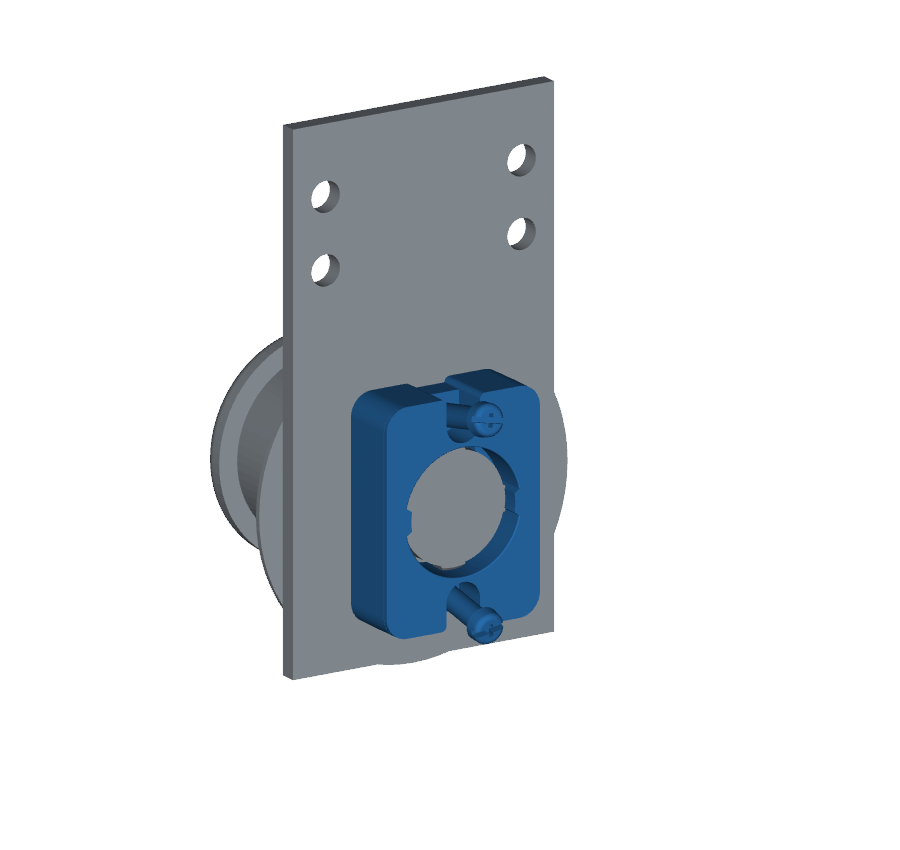
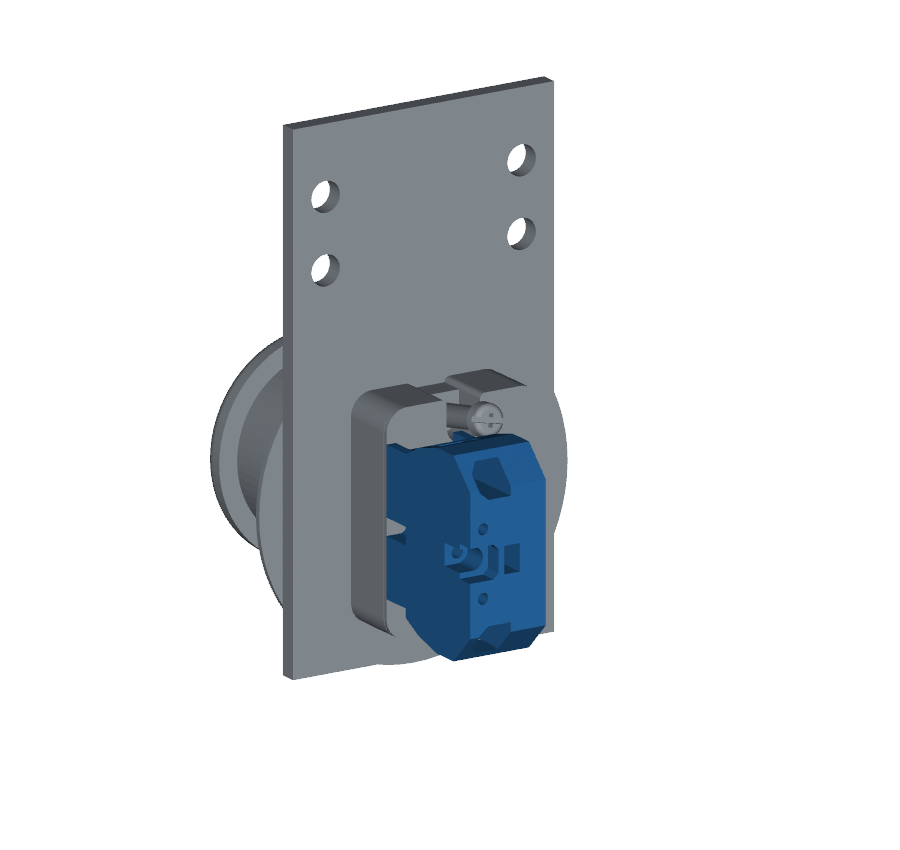
CAD views from inside the robot. Blue identifies the parts being fitted; rail attachment hardware is hidden.
| Interface | Assembly note |
|---|---|
| Side plate to rail | Insert nut strips through the open rail end; use the four existing holes. |
| Operator to plate | Yellow legend outside, support base behind. Engage the operator clockwise and secure as shown in the manufacturer instructions. |
| Contact block | Attach after tightening the support base. A straight 6 mm driver shaft clips the installed block in CAD. |
| Final check | Button must latch and release without the plate or legend moving. Check continuity with power disconnected. |
Driver access cleared the checked frame, battery and Anker with the contact block removed. Hand/handle clearance and final mounting torque remain unverified. The stop/reset circuit is unfinished; this mounting check does not validate its electrical behavior.